Claude Code, with a control bar instead of a scrollback
The real Claude Code, with your skills, your memory and your permissions, running in a block of the window. Above it, everything it knows about itself, drawn as menus a mouse can use.
Why a Claude Code desktop app is the wrong idea, and what to build instead
Every few weeks somebody starts a Claude Code desktop app: a chat window with its own client, its own session store and its own list of models. It works for a month. Then Anthropic ships a model, changes a flag, moves where sessions are kept, and the app is confidently wrong about a program that is sitting right there on the same disk.
Vobuda takes the other road: do not reimplement the agent, attach to it. Underneath the bar runs the actual claude binary you installed, with your skills, your memory, your MCP servers and your permissions. Nothing is proxied. Nothing is reimplemented. What we add is the part a terminal cannot do: reading the agent's state out of its own files and screen, and putting it where a mouse can reach it.
That is the difference between a Claude Code GUI that goes stale and one that cannot. A model that ships tomorrow appears in the menu once Claude Code has been told about it, and nothing here needs changing.
Everything on the bar comes from the agent under it
-
Claude Code slash commands, as menus
Its built-in commands, /compact, /clear, /model, /effort, /cost, /context, /resume, /rewind, /memory, /agents, /mcp and /status among them, each listed with what it does, in your language. An agent draws its own menus with arrow keys, where a mouse cannot reach them at all.
-
Claude Code skills, grouped and counted
Every skill this folder actually has, grouped by where it came from: your own from ~/.claude/skills, the project's from the matching folder inside it, your team's, whatever a plugin brought. Sixty skills across six sources is a list you can look through rather than a name you have to remember.
-
Sessions, by their first line
Read from ~/.claude/projects, with the time each one ran. New starts one, continue sends Claude Code's own --continue, and an older one opens with --resume and its id. You pick a conversation by its first sentence, which is how anybody actually remembers one.
-
The model, and the effort beside it
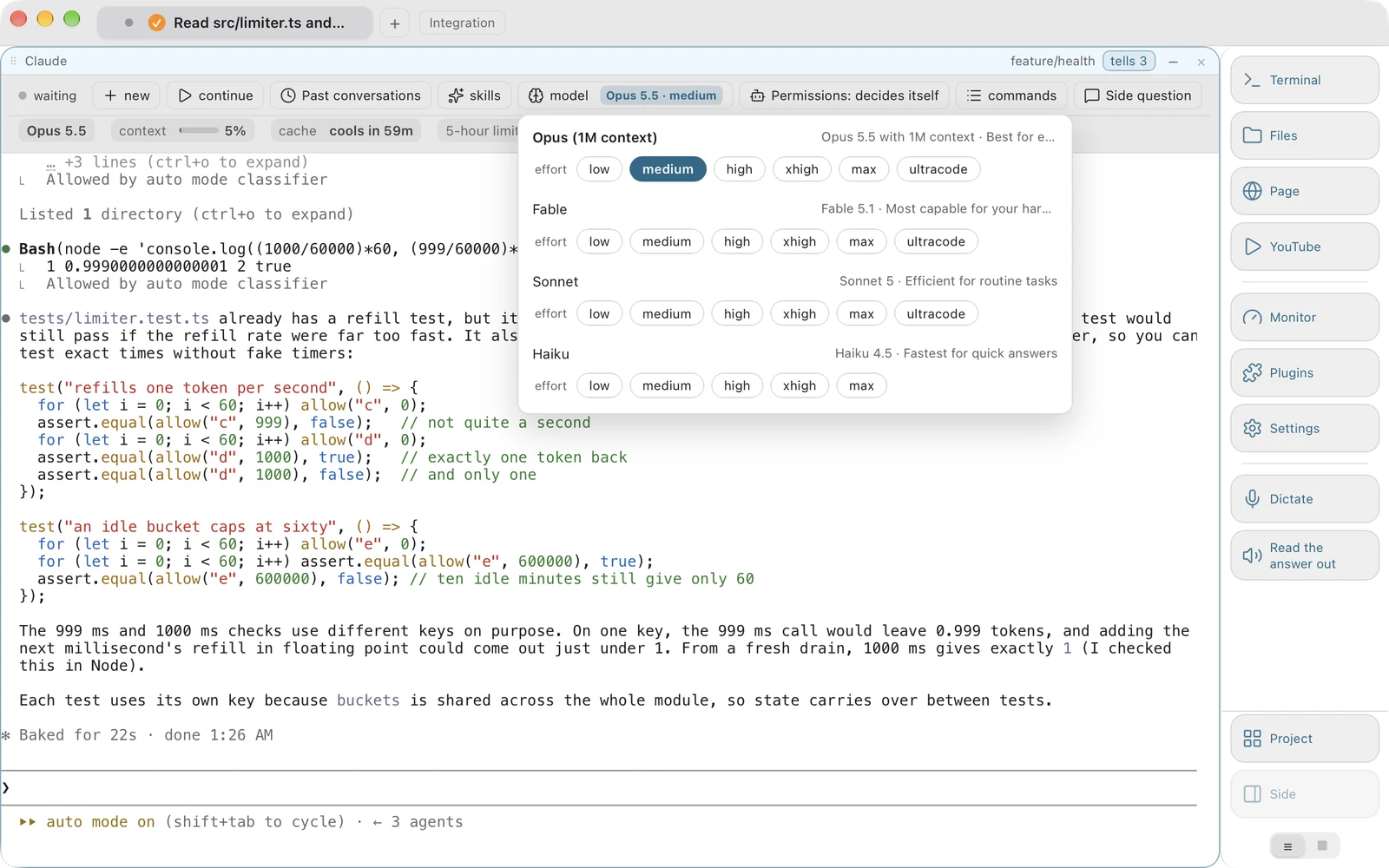
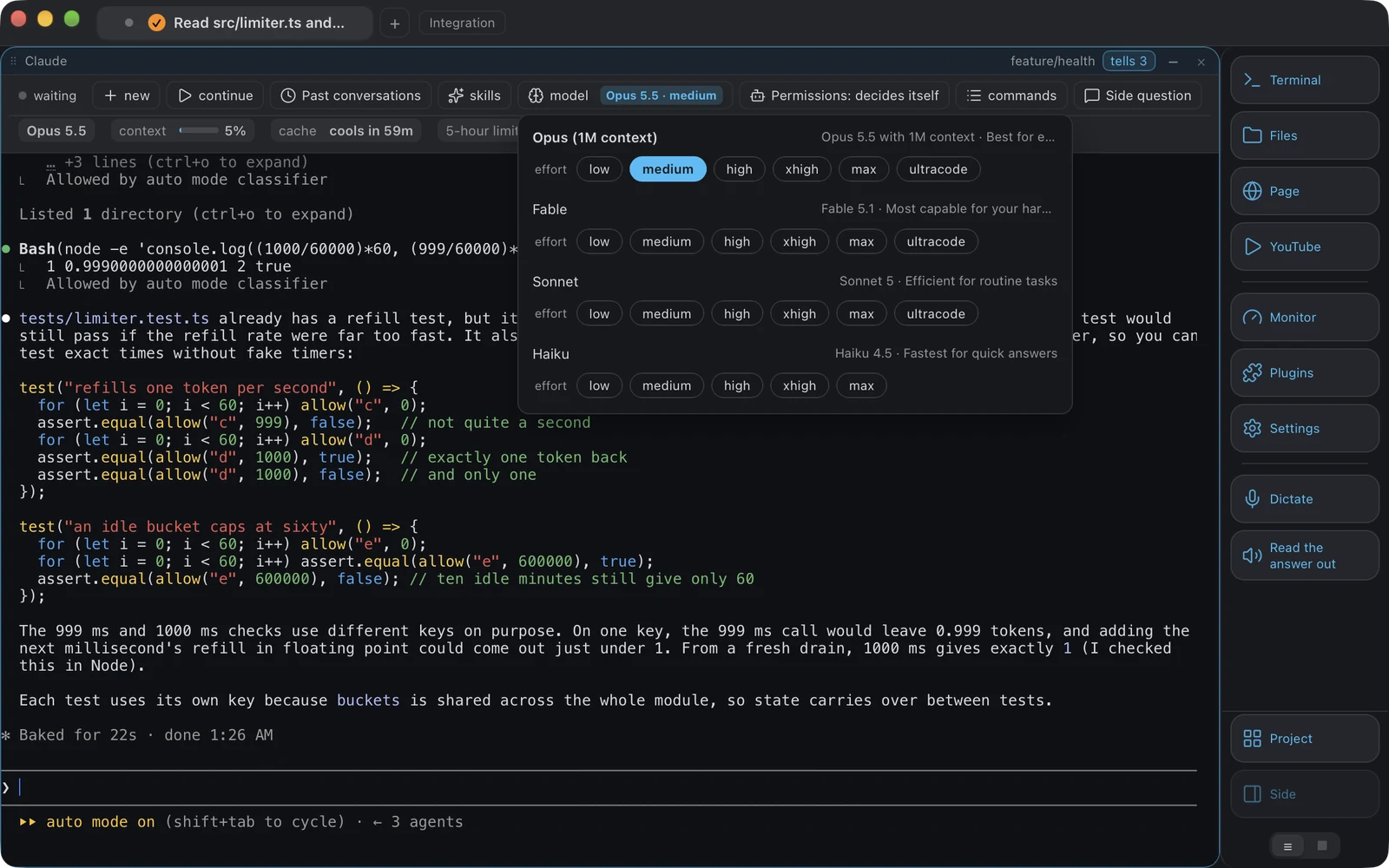
Claude Code's model list comes out of its own file, which is the honest source, checked against the limits your account names: Opus with the million-token context first, Sonnet and Haiku last. The button carries the value rather than the word model: Opus 5.5 with high effort, read off the agent's own status line. And before the screen has said anything, the button shows what Claude Code's own settings.json says it will start with.
-
Plan mode and the rest of the access modes
Claude Code's modes: decide for itself, accept edits, ask before every step, plan only. Read off its own screen and changed by pressing its own key as many times as it takes, rather than a setting of ours that could quietly disagree with what the agent is actually doing.
Three agents, and knowing which one is waiting
A badge says something happened. It does not say what, and by the time you look the screen has scrolled past it.
While you were away
Each time an agent goes from working to waiting, the window keeps one line: which block, which agent, what it was asked, when it stopped, how long it took. The agent panel shows them grouped by block, newest first, with an accent down the left edge of the ones you have not seen. Pressing a line goes to that block.
A gap rather than a guess
The request is read off the agent's own screen by the shape of its input line, never by a word in it, because an agent's furniture changes with every release. When it cannot be read, the line keeps the time and the duration and leaves the request empty. A spell of under five seconds with nothing asked is not kept: that is the agent thinking about a keystroke, and recording those buries the three lines that matter.
When the usage limit arrives
Claude Code can wait out a usage limit by itself and carry on when it returns. When it has not started that wait, the bar shows one button that opens Claude Code's own menu for the limit, and the choice is yours. Vobuda sends nothing of its own. If the work should go on while you are away, keep the Mac awake for a time you choose, from half an hour to twelve hours, in Settings, Agents.
Signals that clear when you act
A badge pulses on the tab, a sound you chose plays, and a system notice arrives when Vobuda is not the window in front. Silent when it is: a notice for something already on screen is what teaches people to switch notices off. It clears on your first action in the window, a click, a key or a scroll.
Vibe coding without losing the thread
The way people actually work with an agent now is a loop: describe, watch, correct, describe again, and run three of those loops at once across three projects. The loop is fine. What breaks is the bookkeeping around it.
You lose which model each block is on, because you changed one an hour ago inside the agent and the window never knew. You lose which of the three is waiting for permission, because all three badges look the same. You lose the session you were in yesterday, because finding it means remembering a name rather than a sentence. And you lose the screenshot you meant to hand it, because saving a file and typing its path is four steps in the middle of a thought.
Every one of those is a piece of state the agent already knows and the terminal already threw away. Reading it back and drawing it is the whole feature. Drag the screenshot straight from the thumbnail in the corner of the screen onto the block where the agent is running, and the agent gets the picture: the same road a path takes, which is exactly how Claude Code wants to be handed one.
What is read, and where it is read from
Nothing on this list is a value we store, apart from the slash commands' descriptions. Each is asked for at the moment it is shown.
| On the bar | Read from |
|---|---|
| Past sessions | ~/.claude/projects, with each session's first line and time |
| Skills | ~/.claude/skills and the matching folder inside the project, grouped by source |
| Slash commands | Claude Code's built-in commands, each described by us in your language |
| Model list | Claude Code's own file, written as its server tells it, and your account's limits |
| Effort levels | The model in use |
| Current model and effort | The agent's own status line, with its settings.json as the answer before the screen speaks |
| Permission mode | Claude Code's own screen, and changed by pressing its own key |
| Continue | The agent's own declared flag: --continue for Claude Code, resume --last for Codex |
An agent is a JSON description in agents.json, recognised by how its process looks, so adding one takes no code. An agent that declares no continue flag does not get the button.
This part was a defect first. The window shipped one model list and one continue flag, written when there was one agent and left global when there were three, so opening a Codex block offered Opus, Sonnet and Haiku, and pressing continue sent codex --continue, which Codex answers with a usage error. Now anything read from a program belongs to that program and is asked for only over it. Codex's model list is no longer ours at all: the menu opens Codex's own picker, reads the rows it shows and presses the one you chose, with each model's own levels.
Claude Code in Vobuda, in detail
Is this a Claude Code GUI or a wrapper?
Neither. The real Claude Code runs in a terminal block, and Vobuda draws a control bar above it from what that installation says about itself. Your skills, memory, MCP servers and permissions are the ones you already have. There is no client of ours between you and the agent.
How do I see past Claude Code sessions?
The sessions menu on the bar lists them by first line and time, read from ~/.claude/projects. Opening one runs Claude Code's own --resume with that session id. Continue runs its own --continue.
Can I change the Claude Code model without typing?
Yes. The model button carries the model in use and opens the models Claude Code's own file says your account can use, with Opus with the million-token context first and Sonnet and Haiku after. The effort button beside it carries the level and offers what the model in use supports. Both keep reading the agent's status line, so changing the model inside the agent updates the buttons rather than leaving them lying.
Does it show Claude Code skills?
It lists every skill the folder actually has, grouped by where it came from and counted, so you can look through them instead of remembering a name. It reads the folders; it does not install, publish or host anything.
Can I run Claude Code and Codex at the same time?
Yes, in two blocks of the same window or in two tabs, each with its own bar reading its own agent. See how the two differ in practice on the comparison page.
What about local models?
A local model through Ollama is an entry in agents.json and needs no code, which is what an agent being a JSON description was for.
Does Vobuda see my conversations?
It reads the agent's own files on your disk to draw the menus, and your conversations go nowhere through us. The one request it makes about your Claude account is for your usage limits: every five minutes while a bar is on screen, it asks Anthropic with the sign-in Claude Code keeps in your Keychain, and the token goes to Anthropic only. There is no account with us and no server of ours in between.
Put a bar on the agent you already run
Free, no account, and the agent underneath is the one you installed.
curl -fsSL https://vobuda.com/install.sh | sh