Claude Code, avec une barre de contrôle au lieu d'un défilement
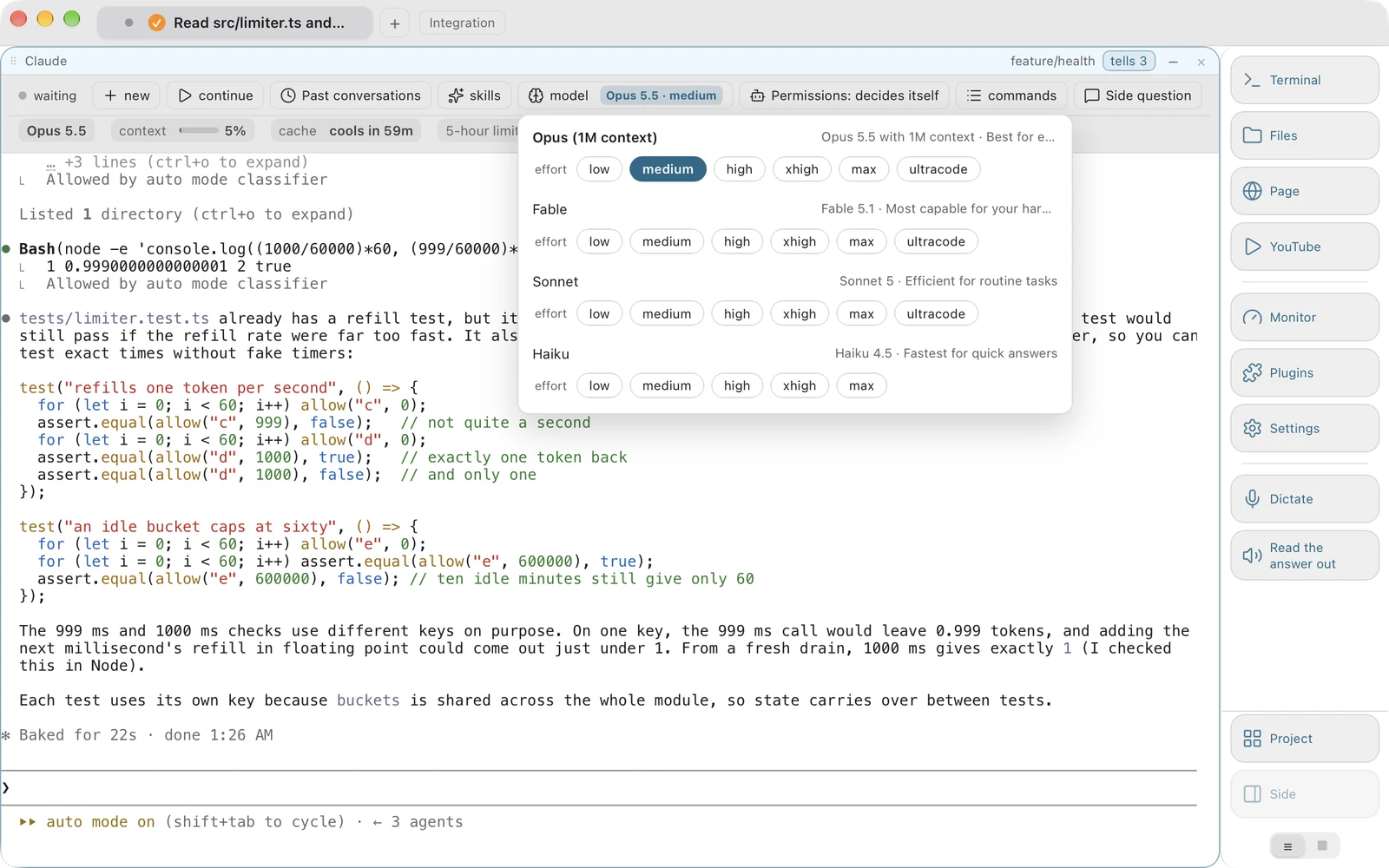
Le vrai Claude Code, avec vos skills, votre mémoire et vos permissions, qui s'exécute dans un bloc de la fenêtre. Au-dessus, tout ce qu'il sait de lui-même, dessiné en menus utilisables à la souris.
Pourquoi une application de bureau Claude Code est une mauvaise idée, et ce qu'il faut construire à la place
Toutes les quelques semaines, quelqu'un se lance dans une application de bureau Claude Code : une fenêtre de chat avec son propre client, son propre stockage de sessions et sa propre liste de modèles. Ça fonctionne pendant un mois. Puis Anthropic sort un modèle, change un flag, déplace l'emplacement des sessions, et l'application se trompe avec assurance sur un programme qui se trouve juste là, sur le même disque.
Vobuda prend l'autre chemin : ne pas réimplémenter l'agent, s'y attacher. Sous la barre tourne le vrai binaire claude que vous avez installé, avec vos skills, votre mémoire, vos serveurs MCP et vos permissions. Rien n'est proxifié. Rien n'est réimplémenté. Ce que nous ajoutons, c'est ce qu'un terminal ne peut pas faire : lire l'état de l'agent dans ses propres fichiers et à l'écran, et le mettre à portée de souris.
C'est la différence entre une interface Claude Code qui devient obsolète et une qui ne le peut pas. Un modèle qui sort demain apparaît dans le menu dès que Claude Code en a été informé, et rien ici n'a besoin d'être changé.
Tout ce qui figure sur la barre vient de l'agent qui tourne dessous
-
Les commandes slash de Claude Code, en menus
Ses commandes intégrées, dont /compact, /clear, /model, /effort, /cost, /context, /resume, /rewind, /memory, /agents, /mcp et /status, chacune listée avec ce qu'elle fait, dans votre langue. Un agent dessine ses propres menus avec les flèches du clavier, là où une souris ne peut absolument pas les atteindre.
-
Les skills Claude Code, regroupées et comptées
Chaque skill que ce dossier possède réellement, regroupée selon sa provenance : les vôtres depuis ~/.claude/skills, celles du projet depuis le dossier correspondant à l'intérieur, celles de votre équipe, ce qu'un plugin a apporté. Soixante skills réparties sur six sources, c'est une liste que l'on parcourt plutôt qu'un nom qu'il faut retenir.
-
Les sessions, par leur première ligne
Lues depuis ~/.claude/projects, avec l'heure de chacune. Nouveau en démarre une, continuer envoie le --continue propre à Claude Code, et une session plus ancienne s'ouvre avec --resume et son id. Vous choisissez une conversation par sa première phrase, ce qui est la façon dont on s'en souvient vraiment.
-
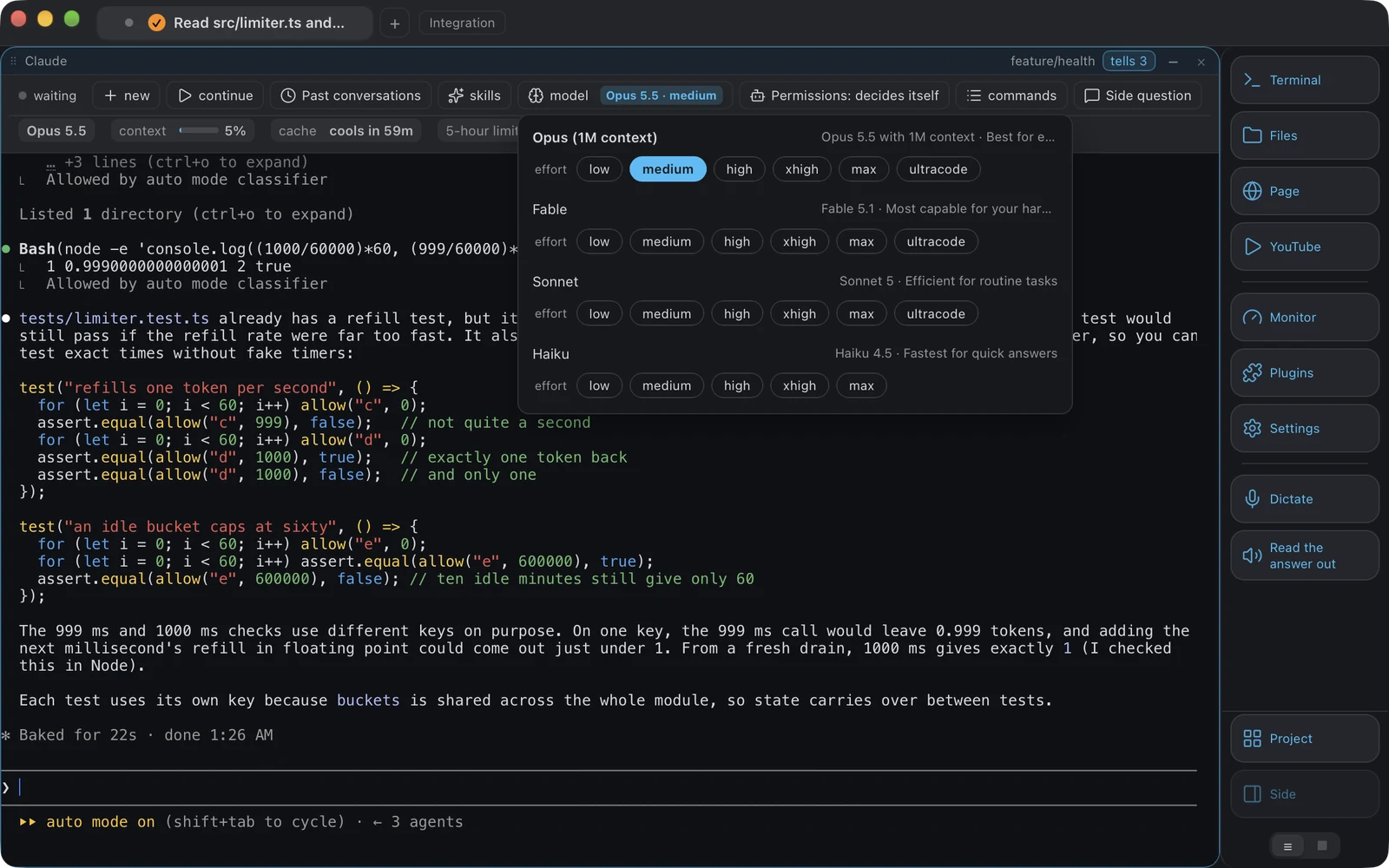
Le modèle, et l'effort à côté
La liste des modèles de Claude Code sort de son propre fichier, qui est la source fiable, recoupée avec les limites que nomme votre compte : Opus avec le contexte d'un million de tokens en premier, Sonnet et Haiku en dernier. Le bouton porte la valeur plutôt que le mot modèle : Opus 5.5 avec un effort élevé, lu sur la ligne de statut de l'agent. Et avant même que l'écran n'ait dit quoi que ce soit, le bouton affiche ce que le settings.json de Claude Code indique comme point de départ.
-
Le mode plan et les autres modes d'accès
Les modes de Claude Code : décider seul, accepter les modifications, demander avant chaque étape, planifier seulement. Lu sur son propre écran et modifié en appuyant sur sa propre touche autant de fois que nécessaire, plutôt qu'un réglage à nous qui pourrait discrètement contredire ce que l'agent fait réellement.
Trois agents, et savoir lequel attend
Un badge indique qu'il s'est passé quelque chose. Il ne dit pas quoi, et le temps que vous regardiez, l'écran a déjà fait défiler l'information.
Pendant votre absence
Chaque fois qu'un agent passe du travail à l'attente, la fenêtre conserve une ligne : quel bloc, quel agent, ce qu'on lui a demandé, quand il s'est arrêté, combien de temps ça a pris. Le panneau des agents les affiche regroupés par bloc, les plus récents en premier, avec un liseré sur le bord gauche de ceux que vous n'avez pas encore vus. Cliquer sur une ligne mène à ce bloc.
Un blanc plutôt qu'une supposition
La demande est lue directement sur l'écran de l'agent grâce à la forme de sa ligne de saisie, jamais grâce à un mot qu'elle contient, car l'interface d'un agent change à chaque version. Quand elle ne peut pas être lue, la ligne conserve l'heure et la durée et laisse la demande vide. Un épisode de moins de cinq secondes sans aucune demande n'est pas conservé : c'est l'agent qui réfléchit à une frappe, et enregistrer ces épisodes noierait les trois lignes qui comptent.
Quand la limite d'utilisation arrive
Claude Code peut attendre tout seul la fin d'une limite d'utilisation et reprendre à son retour. Quand il n'a pas commencé cette attente, la barre montre un bouton qui ouvre le menu propre à Claude Code pour la limite, et le choix vous appartient. Vobuda n'envoie rien de lui-même. Si le travail doit continuer pendant votre absence, gardez le Mac éveillé pour une durée que vous choisissez, de une demi-heure à douze heures, dans Réglages, Agents.
Des signaux qui s'effacent quand vous agissez
Un badge clignote sur l'onglet, un son que vous avez choisi se joue, et une notification système arrive quand Vobuda n'est pas la fenêtre au premier plan. Silencieux quand elle l'est : une notification pour quelque chose déjà à l'écran est exactement ce qui apprend aux gens à désactiver les notifications. Elle s'efface à votre première action dans la fenêtre, un clic, une touche ou un défilement.
Coder à l'instinct sans perdre le fil
La façon dont on travaille vraiment avec un agent aujourd'hui, c'est une boucle : décrire, observer, corriger, redécrire, et faire tourner trois de ces boucles à la fois sur trois projets. La boucle en elle-même fonctionne bien. Ce qui casse, c'est la comptabilité autour.
Vous perdez le fil du modèle utilisé par chaque bloc, parce que vous en avez changé un il y a une heure à l'intérieur de l'agent et que la fenêtre ne l'a jamais su. Vous perdez de vue lequel des trois attend une permission, parce que les trois badges se ressemblent. Vous perdez la session d'hier, parce que la retrouver oblige à se souvenir d'un nom plutôt que d'une phrase. Et vous perdez la capture d'écran que vous vouliez lui donner, parce qu'enregistrer un fichier et en taper le chemin, ça fait quatre étapes en plein milieu d'une idée.
Chacun de ces cas est un état que l'agent connaît déjà et que le terminal a déjà jeté. Le relire et l'afficher, c'est toute la fonctionnalité. Faites glisser la capture d'écran directement depuis la miniature dans le coin de l'écran jusqu'au bloc où l'agent tourne, et l'agent reçoit l'image : le même chemin qu'emprunte un fichier, ce qui est exactement la façon dont Claude Code veut qu'on la lui donne.
Ce qui est lu, et d'où c'est lu
Rien dans cette liste n'est une valeur que nous stockons, hormis les descriptions des commandes slash. Chacune est demandée au moment où elle s'affiche.
| Sur la barre | Lu depuis |
|---|---|
| Sessions passées | ~/.claude/projects, avec la première ligne et l'heure de chaque session |
| Compétences | ~/.claude/skills et le dossier correspondant dans le projet, regroupées par source |
| Commandes slash | Les commandes intégrées de Claude Code, chacune décrite par nous dans votre langue |
| Liste des modèles | Le fichier propre à Claude Code, écrit selon ce que lui dit son serveur, et les limites de votre compte |
| Niveaux d'effort | Le modèle utilisé |
| Modèle et effort actuels | La ligne de statut propre à l'agent, avec son settings.json comme réponse avant que l'écran ne parle |
| Mode de permission | L'écran propre à Claude Code, modifié en appuyant sur sa propre touche |
| Continuer | Le flag propre déclaré par l'agent : --continue pour Claude Code, resume --last pour Codex |
Un agent est une description JSON dans agents.json, reconnu à l'apparence de son processus, si bien qu'en ajouter un ne demande aucun code. Un agent qui ne déclare aucun flag de reprise n'a pas de bouton.
Cette partie a d'abord été un défaut. La fenêtre livrait une seule liste de modèles et un seul flag de reprise, écrits à l'époque où il n'y avait qu'un agent et laissés globaux quand il y en a eu trois, si bien qu'ouvrir un bloc Codex proposait Opus, Sonnet et Haiku, et qu'appuyer sur continuer envoyait codex --continue, auquel Codex répond par une erreur d'utilisation. Désormais, tout ce qui est lu d'un programme appartient à ce programme et n'est demandé qu'à lui. La liste des modèles de Codex n'est plus du tout la nôtre : le menu ouvre le propre sélecteur de Codex, lit les lignes qu'il affiche et appuie sur celle que vous avez choisie, avec les niveaux propres à chaque modèle.
Claude Code dans Vobuda, en détail
Est-ce une interface graphique Claude Code ou un wrapper ?
Ni l'un ni l'autre. Le vrai Claude Code tourne dans un bloc de terminal, et Vobuda dessine une barre de contrôle au-dessus à partir de ce que cette installation dit d'elle-même. Vos skills, votre mémoire, vos serveurs MCP et vos permissions sont ceux que vous avez déjà. Il n'y a aucun client à nous entre vous et l'agent.
Comment voir les sessions Claude Code passées ?
Le menu des sessions sur la barre les liste par première ligne et par heure, lues depuis ~/.claude/projects. En ouvrir une exécute le --resume propre à Claude Code avec l'id de cette session. Continuer exécute son propre --continue.
Puis-je changer le modèle de Claude Code sans taper de commande ?
Oui. Le bouton de modèle porte le modèle utilisé et ouvre les modèles que le fichier propre à Claude Code indique comme utilisables par votre compte, avec Opus et son contexte d'un million de tokens en premier, puis Sonnet et Haiku. Le bouton d'effort à côté porte le niveau et propose ce que le modèle utilisé prend en charge. Les deux continuent de lire la ligne de statut de l'agent, si bien que changer le modèle à l'intérieur de l'agent met les boutons à jour au lieu de les laisser mentir.
Affiche-t-il les skills Claude Code ?
Il liste chaque skill que le dossier possède réellement, regroupée selon sa provenance et comptée, pour que vous puissiez les parcourir au lieu de retenir un nom. Il lit les dossiers ; il n'installe, ne publie ni n'héberge rien.
Puis-je faire tourner Claude Code et Codex en même temps ?
Oui, dans deux blocs de la même fenêtre ou dans deux onglets, chacun avec sa propre barre lisant son propre agent. Voyez en quoi les deux diffèrent en pratique sur la page de comparaison.
Et les modèles locaux ?
Un modèle local via Ollama est une entrée dans agents.json et ne demande aucun code, ce qui est justement l'intérêt qu'un agent soit une description JSON.
Est-ce que Vobuda voit mes conversations ?
Il lit les fichiers propres à l'agent sur votre disque pour dessiner les menus, et vos conversations ne passent par aucun serveur à nous. La seule requête qu'il fait au sujet de votre compte Claude concerne vos limites d'utilisation : toutes les cinq minutes tant qu'une barre est à l'écran, il interroge Anthropic avec la connexion que Claude Code garde dans votre trousseau, et le jeton ne va qu'à Anthropic. Il n'y a aucun compte chez nous et aucun serveur à nous entre les deux.
Mettez une barre sur l'agent que vous faites déjà tourner
Gratuit, sans compte, et l'agent en dessous est celui que vous avez installé.
curl -fsSL https://vobuda.com/install.sh | sh