Warp टर्मिनल के विकल्प के रूप में Vobuda
Warp पिछले कुछ वर्षों का सबसे महत्वाकांक्षी टर्मिनल है और वह जिससे Vobuda की सबसे ज्यादा तुलना की जाती है। फर्क पॉलिश का नहीं है। फर्क इस बात का है कि एजेंट किसका है, और क्या कोई अकाउंट है।
Warp किस चीज़ में अच्छा है
Warp ने वह काम किया जो करने से बाकी सब झिझकते थे: उसने तय किया कि टर्मिनल एक VT100 की वफादार नकल न होकर एक आधुनिक एप्लिकेशन हो सकता है, और उसने GPU रेंडरर तथा वाकई अच्छे एडिटिंग अनुभव के साथ इसे Rust में बनाया। ब्लॉक्स, एक कमांड पैलेट, शेयर की जा सकने वाली वर्कफ़्लो, और एक AI जो आपके लिए कमांड लिखता है। आज लोग टर्मिनल से जो उम्मीद रखते हैं उसका बड़ा हिस्सा इसलिए मौजूद है क्योंकि Warp ने इसे सबसे पहले शिप किया और बाकी सब पीछे-पीछे आए।
अगर आपको चाहिए एक ऐसा प्रोग्राम जो अपने खुद के असिस्टेंट के साथ आए, macOS, Linux और Windows पर एक जैसा काम करे, और जिसके पीछे टीम फीचर्स बनाने वाली कंपनी हो, तो Warp एक मजबूत जवाब है और Vobuda उस काम के लिए मुकाबले में नहीं है।
दोनों में फर्क कहां है
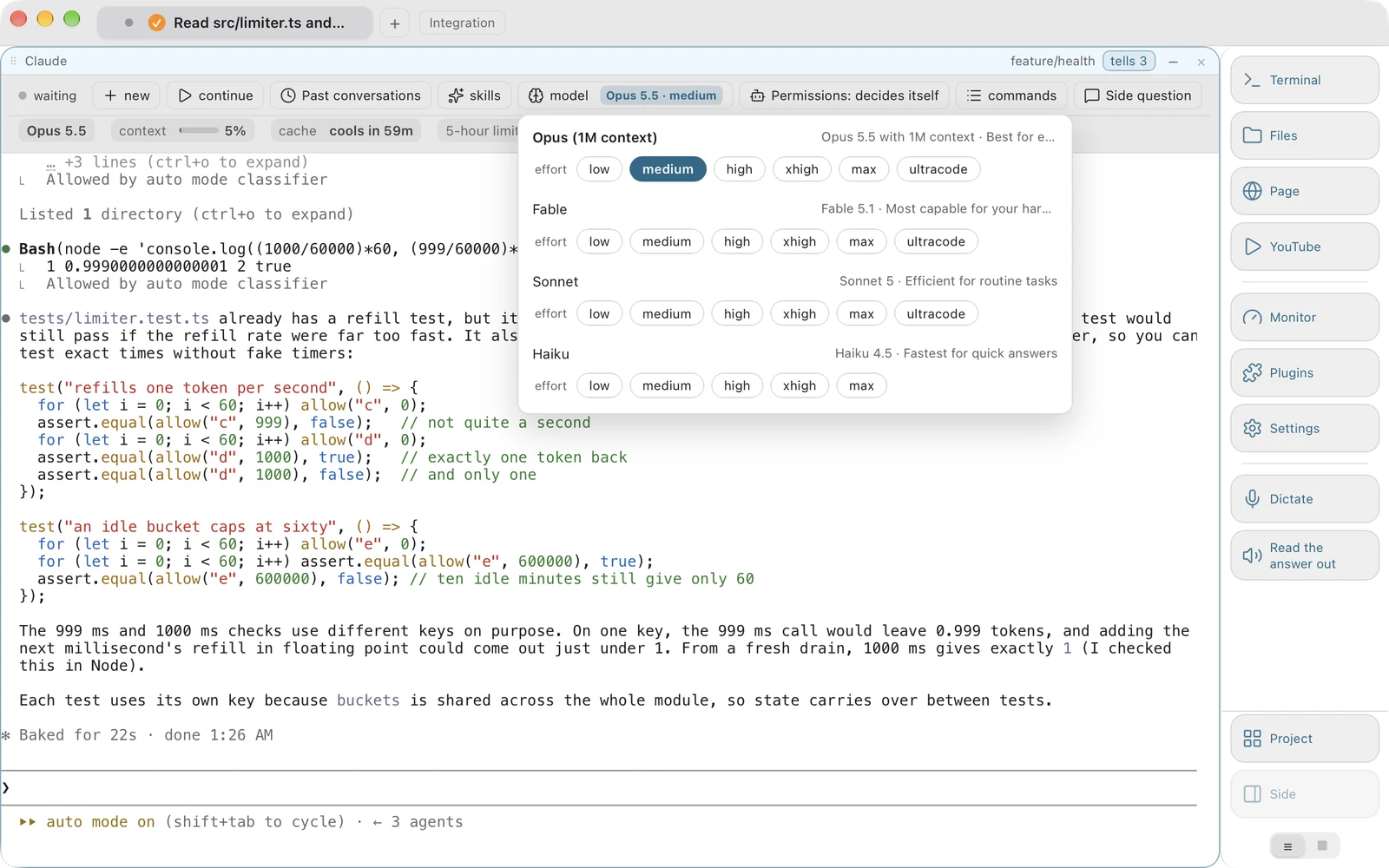
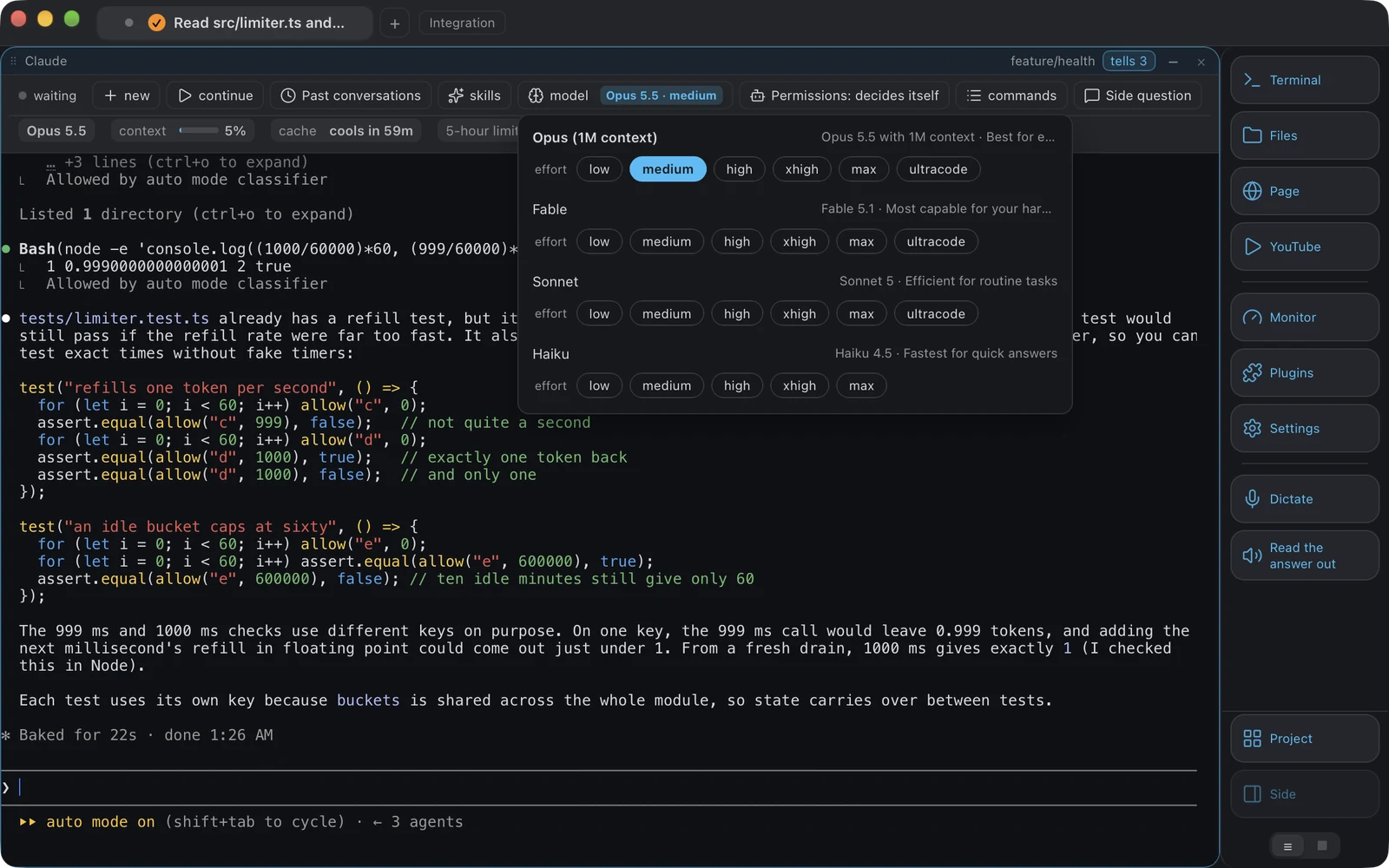
-
एजेंट किसका है
Warp अपना खुद का एजेंट बनाता और चलाता है। Vobuda कोई एजेंट नहीं बनाता: यह आपके पहले से इंस्टॉल किए गए Claude Code या Codex को, उसके स्किल्स, मेमोरी, MCP सर्वर और सब्सक्रिप्शन के साथ होस्ट करता है, और एक कंट्रोल बार जोड़ता है जो उसी इंस्टॉलेशन के अपने सेशन, मॉडल, प्रयास लेवल और परमिशन मोड को पढ़ता है। जब Anthropic या OpenAI कुछ नया लॉन्च करते हैं, तो वह उसी दिन मेनू में दिख जाता है, क्योंकि वह मेनू हमारी नहीं बल्कि उनकी लिस्ट है।
-
अकाउंट
Warp आपसे साइन-इन करवाता है। Vobuda में कोई खाता है ही नहीं, कोई साइन-इन नहीं, हमारा कोई सिंक नहीं और खातों का कोई सर्वर नहीं: खाते के रहने की कोई जगह ही नहीं है। Warp की मौजूदा शर्तें और ऑफ़लाइन बर्ताव जानने के लिए Warp की अपनी साइट देखें, क्योंकि यह एक से ज़्यादा बार बदला है।
-
कॉन्फ़िगरेशन कहां रहता है
Vobuda में हर सेटिंग ~/.config/vobuda में एक पढ़ने योग्य JSON फ़ाइल है, जिसे प्रोग्राम चलते समय देखा जाता है, इसलिए फ़ाइल सहेजते ही विंडो फिर से बनती है। थीम, लुक, मॉनिटर स्किन, डॉक बटन, एजेंट विवरण, शॉर्टकट और प्रोजेक्ट सब फ़ाइलें हैं जिन्हें आप git में रख सकते हैं और एक आर्काइव से दूसरे Mac पर बहाल कर सकते हैं।
-
विंडो में और क्या है
Vobuda में बारह तरह के पैनल वाला सिस्टम मॉनिटर भी है, शेल के बगल में खुली फ़ाइल जिसमें 227 तरह की फ़ाइलों की रंगाई है, ब्लॉक के रूप में वेब पेज, सिस्टम की अपनी मशीन-पर-चलने वाली आवाज़ से डिक्टेशन और ज़ोर से पढ़ना, और आपकी चुनी ग्लोबल कुंजी पर एक क्वेक विंडो। ये वे चीज़ें हैं जिनके लिए लोग वरना तीन और प्रोग्राम खोलते हैं।
आपका कॉन्फ़िगरेशन कहां रहता है
इस तुलना का सबसे छोटा और ईमानदार जवाब। दोनों सैंपल एक जैसी चार चीजें सेट करते हैं: फॉन्ट, साइज़, रंग, ट्रांसपेरेंसी।
accent: '#5a7ffb'background: '#1e2029'foreground: '#c8d3f5'terminal_colors: normal: black: '#3b4261' blue: '#5a7ffb'{ "theme": "tokyo-night", "term": { "font": "JetBrains Mono", "fontSize": 13 }, "window": { "opacity": 0.96, "quakeKey": "cmd+`" }} # themes/, keys.json और skins/ इसी फोल्डर में साथ रहते# हैं। आपके बारे में कुछ भी कहीं और नहीं लिखा जाता।आमने-सामने
सितंबर 2026 के हिसाब से पढ़ें। इसके बाद जो भी बदला हो, उसके लिए उनकी अपनी साइट ही आखिरी जवाब है।
| vobuda | Warp | |
|---|---|---|
| प्लेटफॉर्म | macOS 10.15+, Linux | macOS, Linux, Windows |
| सोर्स | क्लोज्ड, फ्री | क्लोज्ड |
| अकाउंट | कोई नहीं | साइन-इन जरूरी; मौजूदा शर्तों के लिए उनकी साइट देखें |
| कीमत | पर्सनल और कमर्शियल दोनों काम के लिए फ्री | फ्री टियर और पेड प्लान; उनका प्राइसिंग पेज देखें |
| AI एजेंट | Claude Code, Codex या लोकल मॉडल होस्ट करता है और उसकी स्थिति पढ़ता है | अपना खुद का बिल्ट-इन एजेंट |
| कॉन्फ़िगरेशन | पढ़ने लायक JSON फ़ाइलें, हॉट-रीलोड होती हैं | सेटिंग्स इंटरफेस, साथ में कुछ फ़ाइलें |
| सिस्टम मॉनिटर | बारह तरह के पैनल, स्किन फ़ाइल से सजाए हुए | नहीं |
| शेल के बगल में एडिटर | 227 तरह की फ़ाइलें, प्रोजेक्ट सर्च, कई कर्सर | नहीं |
| स्पीच | डिक्टेशन और ज़ोर से पढ़ना, मशीन पर ही, केवल macOS पर | नहीं |
| इंटरफेस भाषाएं | 40, हर एक में गाइड के साथ | अंग्रेज़ी |
vobuda के बारे में किया गया हर दावा इस साइट के बिल्ड में जांचा जा सकता है। एक ही पेज पर पूरा मैदान देखें।
Warp और vobuda, साफ-साफ पूछा गया
क्या Warp टर्मिनल फ्री है?
Warp में एक फ्री टियर और पेड प्लान हैं, और शर्तें एक से ज्यादा बार बदल चुकी हैं, इसलिए उनका प्राइसिंग पेज ही भरोसेमंद जवाब है। Vobuda बिना किसी टियर के फ्री है, पर्सनल और कमर्शियल दोनों तरह के काम के लिए।
क्या Warp के लिए अकाउंट जरूरी है?
Warp आपसे साइन-इन करवाता है। Vobuda में खाता प्रणाली है ही नहीं: हमारा ऐसा कोई सर्वर नहीं है जिस पर कोई खाता रह सके।
क्या Vobuda, Warp की नकल है?
नहीं। इनमें समानता बस इतनी है कि दोनों टर्मिनल को म्यूज़ियम की चीज़ नहीं बल्कि एक एप्लिकेशन मानते हैं। बुनियाद उलटी है: Warp असिस्टेंट बनाता है, जबकि Vobuda एजेंट बनाने से इनकार करता है और इसके बजाय आपके चुने हुए असिस्टेंट को दिखाई देने लायक और कंट्रोल करने लायक बनाता है।
क्या मैं Warp में Claude Code इस्तेमाल कर सकता हूं?
आप Claude Code को किसी भी टर्मिनल में चला सकते हैं, Warp सहित, क्योंकि यह एक कमांड-लाइन प्रोग्राम है। फर्क इस बात का है कि टर्मिनल उसके सेशन, स्किल्स, मॉडल और परमिशन मोड को पढ़कर एक बार पर दिखाता है या नहीं।
इस पेज से बेहतर तुलना दस मिनट में हो जाएगी
यह एक लाइन में इंस्टॉल हो जाता है, एक ही टर्मिनल ब्लॉक के साथ खुलता है और आपसे कुछ नहीं लेता।
curl -fsSL https://vobuda.com/install.sh | sh